Virtual COM Ports
Create the ShackScope virtual serial pair first, then add optional OmniRig or other routing pairs if needed.
Integrations
These focused setup guides explain how ShackScope and station software can communicate through ShackMaestro, optional OmniRig, and virtual COM ports without competing for the radio connection.
Station architecture
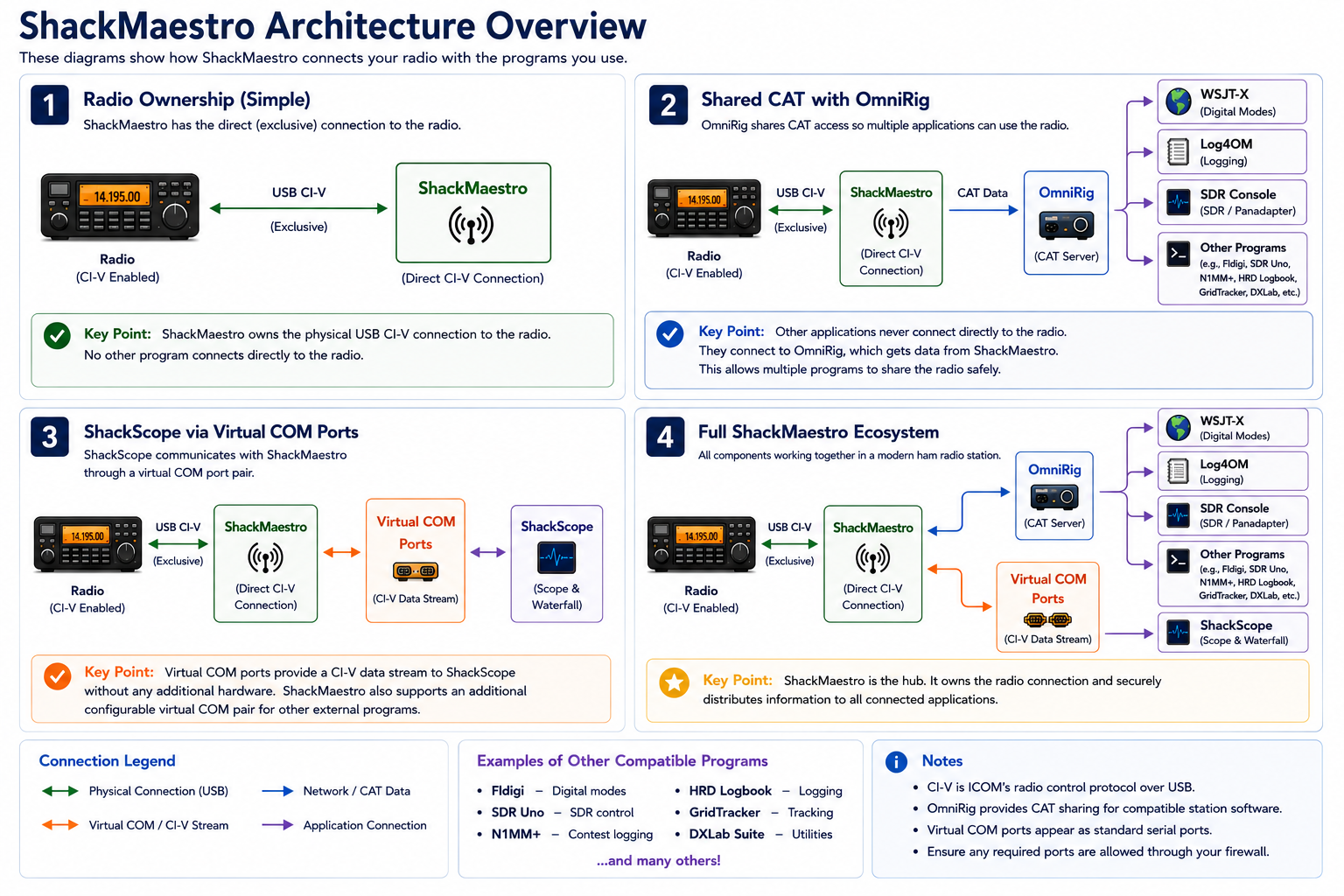
ShackMaestro should be the only application opening the physical USB/CI-V COM port connected to the radio. ShackScope should use the ShackScope virtual COM pair. Other programs should use optional OmniRig, ShackMaestro\'s Virtual COM Bridge, or another non-conflicting path so multiple applications can operate together without fighting for the same serial connection.
Focused guides
Start with the direct ShackMaestro-to-radio connection, then verify ShackScope. After that, add optional OmniRig and the station software you use, one program at a time.
Create the ShackScope virtual serial pair first, then add optional OmniRig or other routing pairs if needed.
Configure the shared CAT layer used by many ham radio applications only if your station uses OmniRig-aware software.
Confirm executable paths, startup order, and startup delays.
Configure digital-mode CAT control. OmniRig is one supported option when your station uses it.
Use OmniRig for logging frequency and mode tracking if your station uses OmniRig.
Configure external radio tracking through OmniRig if your station uses it.
Other compatible programs
WSJT-X, Log4OM, and SDR Console are included because they are common station applications and are useful examples for first-time setup. Other programs can also be integrated when they support OmniRig, CAT control, or a suitable virtual COM workflow.
Examples include Fldigi, WSJT-X, and other digital-mode programs that can use shared CAT control.
Examples include Log4OM, N1MM+, HRD Logbook, DXLab, and other logging tools that support OmniRig or CAT integration.
Examples include SDR Console, SDR Uno, GridTracker, and other tools that can follow radio frequency or mode through the station software chain.
Best practice
After ShackMaestro is working with the radio, verify ShackScope first. Then add optional OmniRig and external programs one at a time. Confirm each success check before moving to the next program. This makes setup problems much easier to isolate.