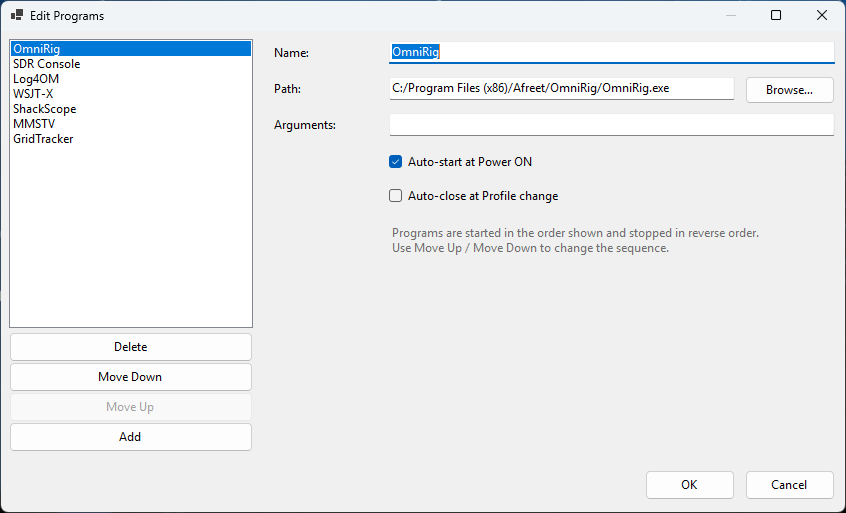
ShackMaestro Edit Programs
Use this dialog to review enabled programs, executable paths, and startup order for external station applications. Startup delays are available when a program needs extra time to initialize.
External Program Configuration
ShackMaestro can launch common station programs during startup, but each path should be verified on the user’s PC.
Purpose
ShackMaestro can automatically start companion and third-party station applications so the operating environment comes online in a predictable order. This is especially helpful when ShackScope, optional OmniRig, logging software, digital-mode software, and spectrum software are all part of the same station workflow.
Use this dialog to review enabled programs, executable paths, and startup order for external station applications. Startup delays are available when a program needs extra time to initialize.
Default programs
On first run, ShackMaestro uses the default program configuration as the starting point for the local Programs.json file. Current default entries include:
Optional CAT-sharing layer for compatible applications when your station uses OmniRig-aware software.
The companion spectrum, waterfall, and meter display application installed with ShackMaestro.
Common digital-mode application, typically configured to use OmniRig for CAT control.
Common logging application, typically configured to use OmniRig for CAT control.
Common spectrum/SDR application, typically configured to use OmniRig for CAT control in this setup.
Additional programs
The default entries focus on common examples, but the same external-program and CAT-sharing approach may be useful with other software such as Fldigi, SDR Uno, N1MM+, HRD Logbook, GridTracker, DXLab, and similar applications. ShackMaestro also supports an additional configurable virtual COM pair for external programs that need a CI-V/CAT data stream. Verify each program’s executable path, startup behavior, and CAT/OmniRig configuration before relying on automatic startup.
Steps
In ShackMaestro, open the program configuration dialog from the Settings/Programs area.
Verify the configured path for ShackScope, WSJT-X, Log4OM, SDR Console, optional OmniRig, and any other station programs you add. Adjust any entry that does not match the actual installation location on the PC.
If a program is not installed or not part of the current station setup, disable it or update the path before relying on automatic startup.
Programs are started in the order shown in the list. This allows ShackMaestro to establish communication with the radio before dependent applications start and ensures supporting software initializes in the proper sequence.
The default startup timing works well for most stations. If a particular application requires additional time to initialize, its startup delay can be adjusted.
Related program setup
ShackMaestro can launch these programs, but each program still needs to be configured to use the correct CAT path. The pages below show the recommended setup screens and values.
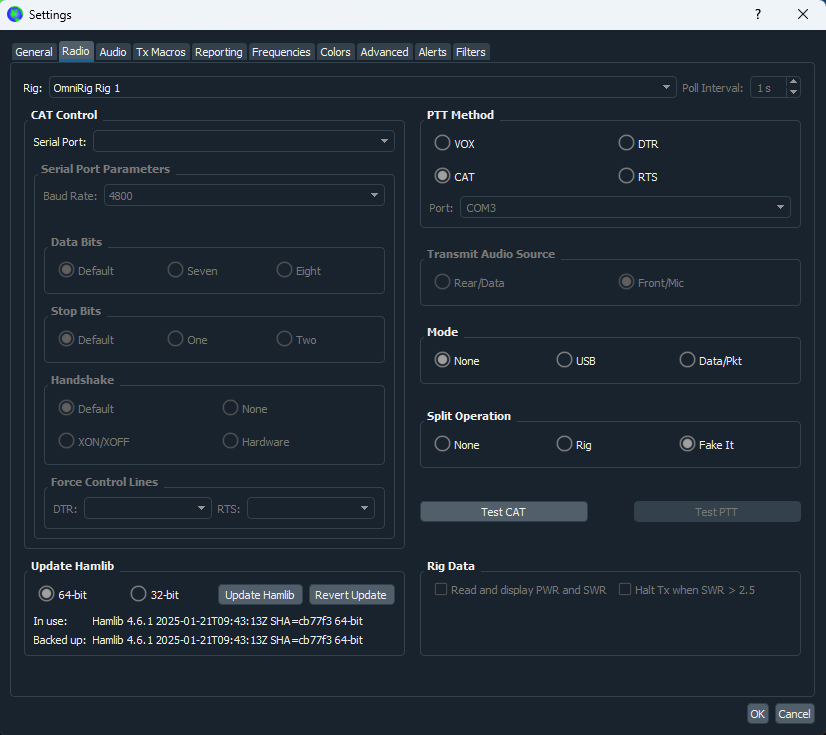
Configure WSJT-X for your selected CAT path. If your station uses OmniRig, select the OmniRig radio slot configured in ShackMaestro.
Open WSJT-X guide →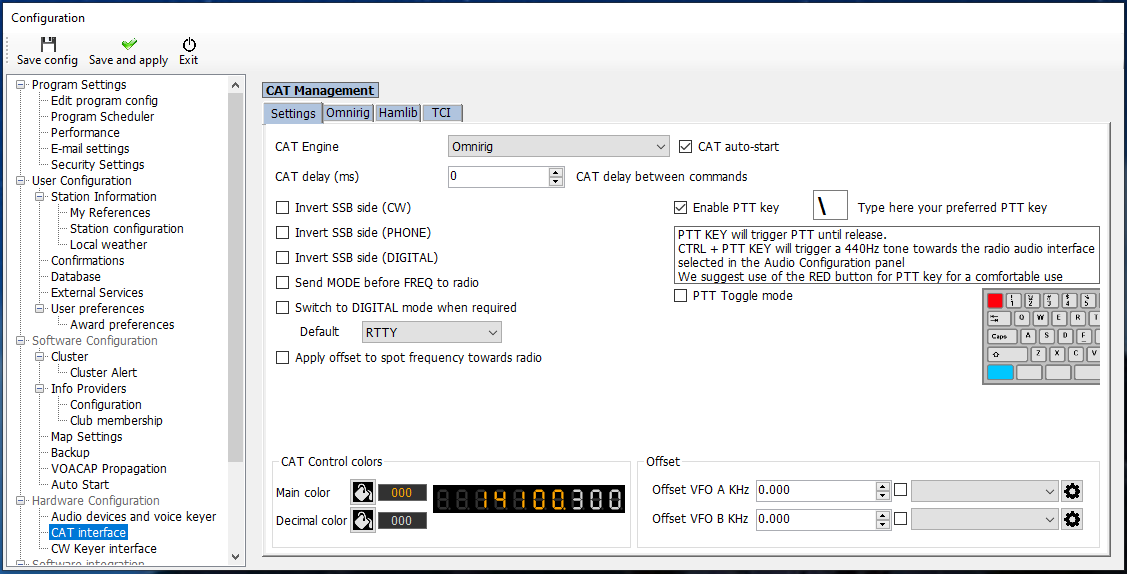
Configure Log4OM for your selected CAT path. If your station uses OmniRig, select OmniRig as its CAT engine so it tracks the radio through ShackMaestro’s shared CAT path.
Open Log4OM guide →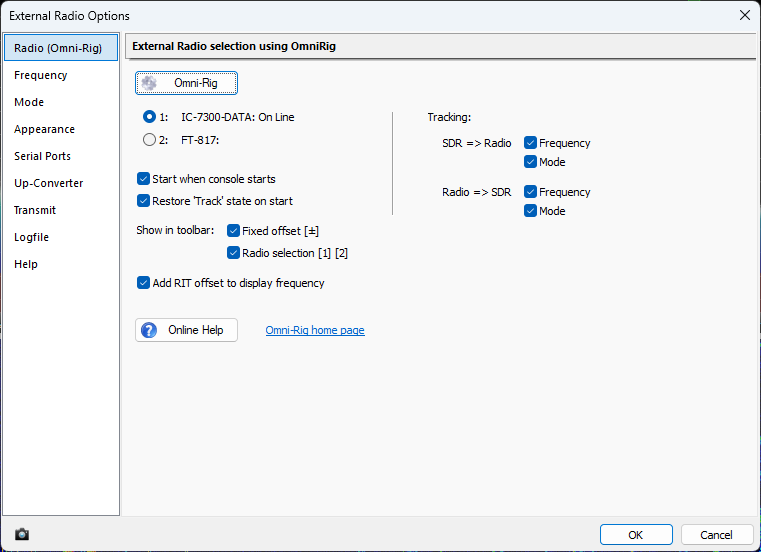
Configure SDR Console External Radio options for your selected tracking path. If your station uses OmniRig, select OmniRig for frequency and mode synchronization.
Open SDR Console guide →Troubleshooting
Confirm the executable path is correct and that the application is installed in the expected location.
Check whether both 32-bit and 64-bit versions exist, or whether an older install remains in another folder.
Verify the relevant CAT settings, virtual COM settings, and startup order first. Then consider increasing the startup delay for a program that needs more time to initialize.
Recommended workflow
If ShackScope, optional OmniRig, WSJT-X, Log4OM, SDR Console, or another station program does not start as expected, first confirm the configured executable path and whether the program is enabled in ShackMaestro.