SDR Console External Radio Options
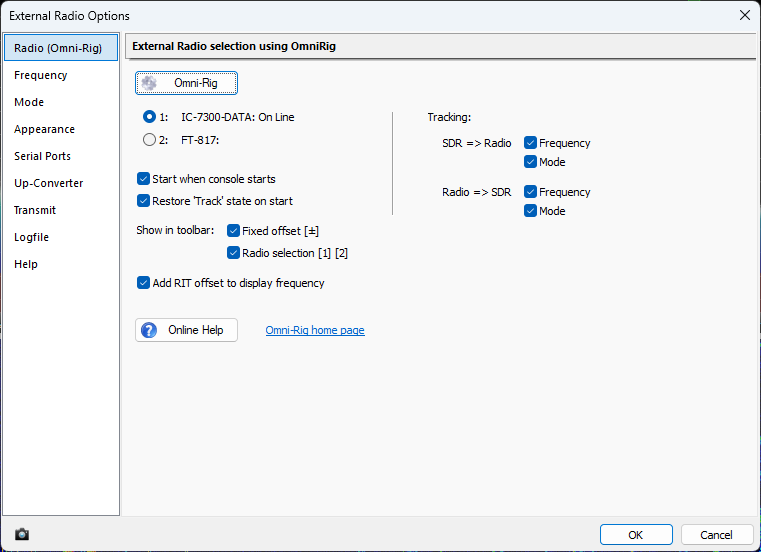
If you use OmniRig, enable it and choose the desired frequency and mode tracking directions.
SDR Console Integration
Use this guide to connect SDR Console into the ShackMaestro station ecosystem.
What this does
SDR Console can track and control the radio through OmniRig when your station uses OmniRig. Avoid having SDR Console open the same physical USB/CI-V COM port that ShackMaestro is using.
If you use OmniRig, enable it and choose the desired frequency and mode tracking directions.
Setup steps
In SDR Console, open the External Radio window.
Click the ? in the menu bar of the External Radio window to open External Radio Options.
If you use OmniRig, choose the OmniRig radio slot that matches your ShackMaestro/OmniRig configuration.
Enable frequency and mode tracking in the desired directions, such as SDR → Radio and Radio → SDR.
Click OK, then confirm SDR Console tracks radio frequency and mode changes.