
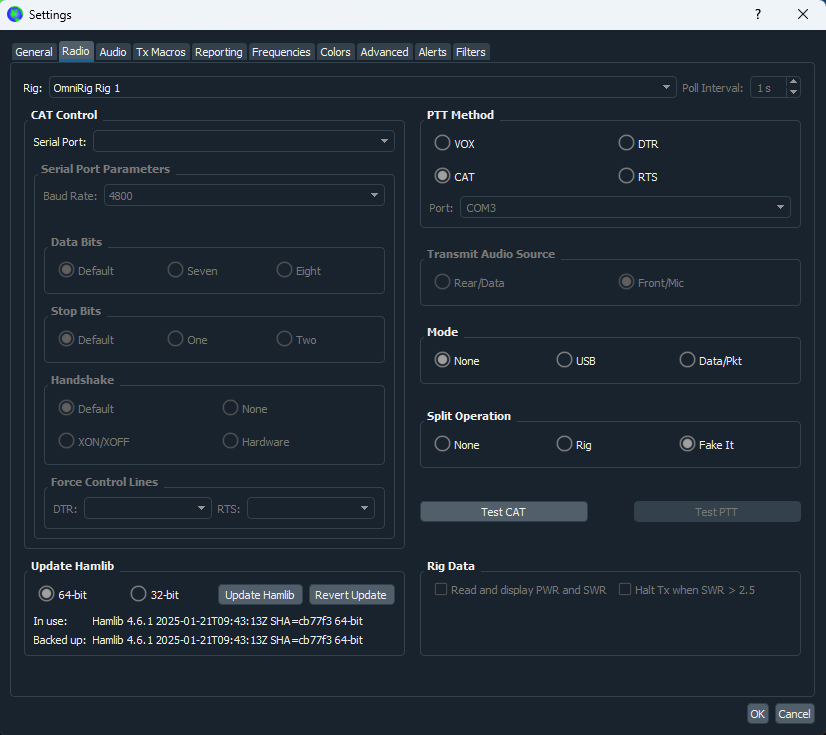
WSJT-X Radio Settings
If you use OmniRig, select the OmniRig rig slot that matches the Rig Slot configured in ShackMaestro Radio Settings.
WSJT-X Integration
Use this guide to connect WSJT-X without having it open the physical radio COM port directly.
What this does
WSJT-X can communicate through OmniRig when your station uses OmniRig, or through another compatible CAT path. Avoid having WSJT-X open the same physical radio COM port that ShackMaestro is using.
If you use OmniRig, select the OmniRig rig slot that matches the Rig Slot configured in ShackMaestro Radio Settings.
Setup steps
In WSJT-X, go to File → Settings, then select the Radio tab.
If you use OmniRig, set Rig to OmniRig Rig 1 or OmniRig Rig 2, depending on which OmniRig slot is chosen in ShackMaestro Radio Settings.
Set PTT Method to CAT, Mode to None, and Split Operation to Fake It.
Click OK, then confirm WSJT-X tracks the radio frequency and can communicate through the CAT path you selected.