Log4OM CAT Interface
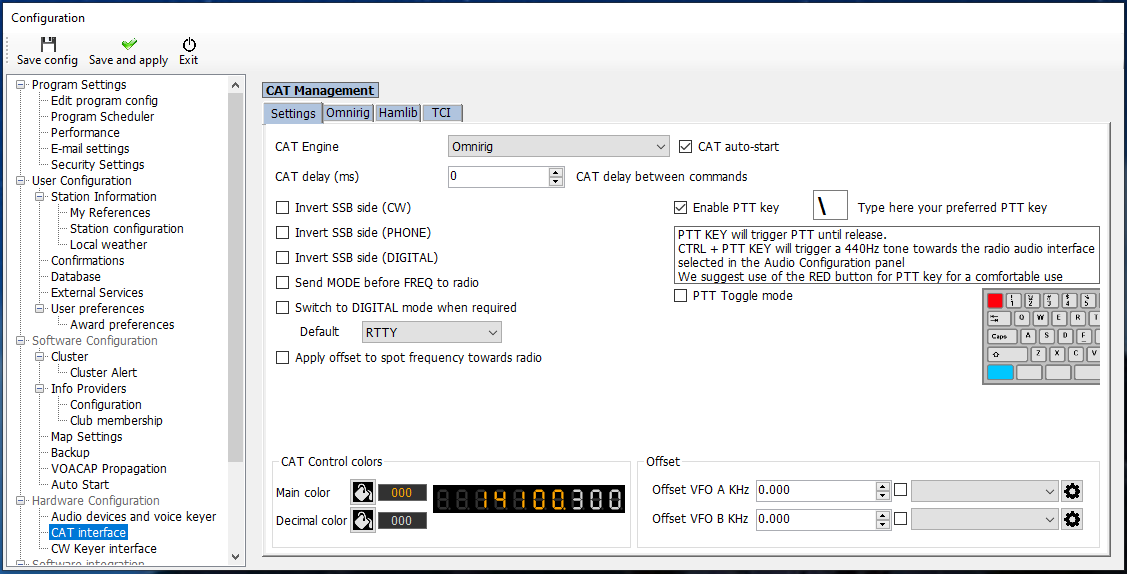
If you use OmniRig, set the CAT Engine to OmniRig, then save and apply the configuration.
Log4OM Integration
Use this guide to connect Log4OM for logging and tracking without direct COM-port conflicts.
What this does
Log4OM can receive radio frequency and mode information through OmniRig when your station uses OmniRig. Avoid having Log4OM open the same physical radio COM port that ShackMaestro is using.
If you use OmniRig, set the CAT Engine to OmniRig, then save and apply the configuration.
Setup steps
In Log4OM, go to Settings → Program Configuration.
Select Hardware Configuration → CAT Interface.
If you use OmniRig, set CAT Engine to OmniRig.
Click Save and Apply to activate the setting.