ShackScope pair
Default pair: COM15/COM14. ShackMaestro and ShackScope should use opposite sides of this pair. These defaults are already reflected in both applications.
Virtual COM Ports
Virtual COM ports are the bridge between ShackMaestro, ShackScope, optional OmniRig, and selected station software workflows. Start with the ShackScope pair, then add others only when needed.
Purpose
A virtual COM pair is two linked software ports. Data written to one side appears on the other side. ShackMaestro owns the physical USB/CI-V connection to the radio, so ShackScope and optional OmniRig can communicate with ShackMaestro through virtual COM pairs instead of opening the radio COM port directly.
Default pairs
Default pair: COM15/COM14. ShackMaestro and ShackScope should use opposite sides of this pair. These defaults are already reflected in both applications.
Common pair: COM17/COM16. One side is assigned to ShackMaestro’s OmniRig bridge and the opposite side is selected in OmniRig when your station uses OmniRig.
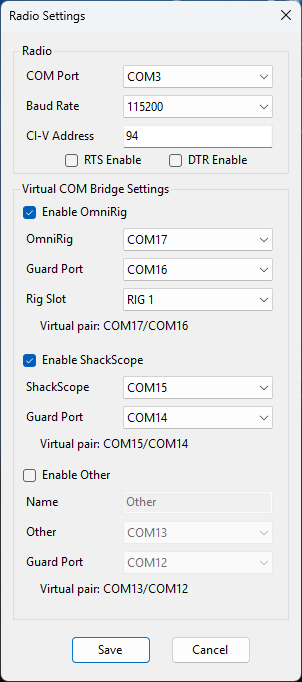
The Radio Settings dialog shows the configured radio COM port and the virtual COM paths used for ShackScope, optional OmniRig, and other bridge connections.
Steps
Download com0com from the com0com download page, then follow its administrator/install instructions.
Create COM15/COM14, unless those numbers are already in use. ShackMaestro and ShackScope should use opposite sides of that pair.
Create COM17/COM16, unless those numbers are already in use. Assign one side to ShackMaestro’s OmniRig path and the other side in OmniRig. Skip this step if your station is not using OmniRig.
Open ShackMaestro Radio Settings and confirm the virtual COM paths match the pairs you created.
If something does not work, verify that both programs are not accidentally configured to use the same side of the pair.
Recommended workflow
Verify the ShackMaestro-to-radio connection first, then confirm the ShackScope virtual COM pair. After ShackScope is working, configure optional OmniRig and other station software one step at a time.