ShackScope Setup

Connect the companion spectrum and waterfall display.

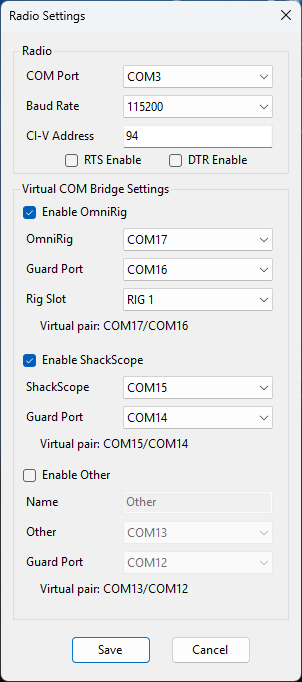
ShackScope uses the default COM15/COM14 virtual COM pair to communicate with ShackMaestro and should be verified before optional third-party integrations are added.

Purpose

ShackScope provides the companion spectrum, waterfall, and meter display.

ShackScope works alongside ShackMaestro and uses the radio’s CI-V scope data path rather than requiring a separate SDR receiver. ShackMaestro owns the radio USB connection and passes the needed scope information to ShackScope through the configured virtual COM pair.

Default planning: ShackMaestro and ShackScope currently default to the COM15/COM14 virtual pair. The programs should use opposite sides of the same pair.
ShackMaestro Radio Settings dialog

Where the ShackScope port is configured

Use ShackMaestro Radio Settings to confirm the ShackScope virtual COM path, then verify ShackScope is using the opposite side of the same pair. On first run, ShackScope seeds its radio COM port, baud rate, and CI-V address from ShackMaestro Radio Settings while still owning its own General Settings file.

Steps

Bring ShackScope online after ShackMaestro is working.

1

Verify ShackMaestro radio control

Make sure ShackMaestro can communicate with the radio before troubleshooting ShackScope.

2

Confirm the COM15/COM14 virtual COM pair

Verify the default ShackScope virtual COM pair exists and that ShackMaestro and ShackScope are using opposite sides of the pair.

3

Start ShackScope

Launch ShackScope and confirm the spectrum, waterfall, meter, and frequency displays begin updating. If you changed ShackMaestro Radio Settings for a radio such as an IC-705 before first launch, ShackScope should import those first-run radio communication values automatically.

4

Use Restart Scope if needed

If the display does not visually start even though the station is otherwise connected, use Settings → Restart Scope.

5

Add other station software later

Once ShackScope is stable, add optional OmniRig and other applications one at a time so any configuration issue is easier to isolate.

Troubleshooting

Common ShackScope issues.

No spectrum or waterfall

Confirm ShackMaestro is running, the radio is connected, the CI-V address matches the radio, and the virtual COM settings are correct.

Wrong side of the COM pair

ShackMaestro and ShackScope must use opposite sides of the same linked pair.

Rare startup edge case

Use Settings → Restart Scope to recover the scope stream without restarting the full application.

Recommended workflow

Add one piece at a time.

Create the ShackScope virtual COM pair first, then verify the ShackMaestro-to-radio connection. After that, configure ShackScope, optional OmniRig, and other station software one step at a time.